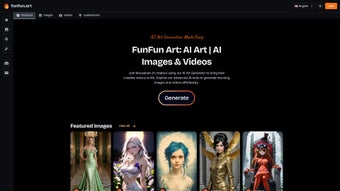

Download funfun.art – AI‑Powered Design Tool for Images & Video
Overview
funfun.art is a cloud‑based AI design platform that lets anyone create high‑quality images and short videos in seconds, without the steep learning curve of traditional graphics suites. Powered by a state‑of‑the‑art text‑to‑image and text‑to‑video engine, the service interprets natural‑language prompts and instantly renders photorealistic pictures, stylized illustrations, or looping motion clips. The platform targets a broad audience: hobbyists looking for quick memes, social‑media managers needing eye‑catching assets, and professional designers who want rapid concept sketches or mood‑board material.
A subscription model unlocks unlimited renders, premium style packs, and full access to a vibrant community hub where creators can publish, remix, and comment on each other’s work. While the UI can feel dense for first‑time users and fine‑grained vector editing is limited compared to desktop applications, funfun.art compensates with speed, cross‑device accessibility, and a constantly expanding library of AI models. Security is built‑in, with encrypted cloud storage and two‑factor authentication, ensuring that every generated file remains private and portable.
In short, funfun.art delivers a complete, browser‑only workflow for AI‑enhanced visual creation, making it a strong contender in the rapidly growing market of generative design tools.
Key Features That Accelerate Your Creative Workflow
- AI Art Generator – Transform simple text prompts into photorealistic images, stylized illustrations, or looping video clips within 5‑15 seconds.
- Dynamic Style Library – Choose from over 150 pre‑trained styles, ranging from classic oil painting to futuristic glitch aesthetics, and switch instantly.
- One‑Click Export – Download assets as PNG, JPEG, SVG for images, or MP4 and GIF for videos, ready for social media, print, or further editing.
- Version History & AI‑Assist – Track every iteration, let the AI suggest refinements, and revert to previous versions with a single click.
- Secure Cloud Storage – All creations are encrypted at rest and in transit, with automatic backups and cross‑device syncing.
- Community Hub – Publish, comment, and remix works within a global network, fostering collaboration and inspiration.
- Regular Model Updates – Monthly releases introduce new AI models, style packs, and performance enhancements.
- Multi‑Language Prompt Support – Write prompts in English, Spanish, Mandarin, French, and several other languages.
- Integrated Marketplace – Sell your AI‑generated assets or purchase premium style bundles directly through the platform.
- Responsive Design – Fully optimized for desktops, tablets, and smartphones; works on Windows, macOS, Linux, Android, and iOS browsers without any installation.
Installation, Usage Instructions, and Compatibility
Because funfun.art runs entirely in the browser, it is compatible with any modern operating system that supports HTML5, including Windows 10/11, macOS Ventura and later, major Linux distributions, Android 9 +, and iOS 13 +. No downloads, plugins, or local installations are required—just a stable internet connection and a supported web browser.
Step‑by‑Step Setup
- Create an Account – Click “Sign Up”, enter your email address, set a password, and confirm via the activation link.
- Select a Subscription – Choose between the monthly ($9.99) or annual ($99) plan; both grant unlimited renders, premium style packs, and community access.
- Access the Dashboard – After logging in, you land on the main dashboard where you can start a new project, explore the style library, or browse the community feed.
- Generate Your First Artwork – Click “New Project”, type a concise prompt (e.g., “a neon‑lit cyberpunk city at dusk”), select a style, and press “Generate”. The AI processes the request and displays the result within seconds.
- Refine & Export – Use the “Adjust” panel to tweak color balance, contrast, or animation speed. When satisfied, click “Export” and choose the desired format (PNG, SVG, MP4, GIF).
- Engage with the Community – Publish your creation, add relevant tags, and interact with other creators through comments, likes, and remix requests.
Tips for Getting the Most Out of funfun.art
- Keep prompts clear and specific; the AI interprets concise language more accurately.
- Experiment with the “Style Strength” slider to balance your original concept with the chosen artistic style.
- Use “Version History” to compare multiple iterations and select the strongest visual.
- Participate in weekly community challenges to discover new techniques and increase visibility.
- Ensure your browser is up‑to‑date for optimal performance and security.
Pros, Cons, Frequently Asked Questions, and Final Verdict
Pros & Cons
- Pros
- Instant AI generation of high‑quality images and videos.
- Fully browser‑based—no installation or hardware requirements.
- Extensive style library and regular model updates keep creativity fresh.
- Secure cloud storage with encrypted assets and two‑factor authentication.
- Active community hub encourages collaboration, feedback, and networking.
- Cons
- Limited fine‑grained control compared to desktop vector or raster editors.
- Interface can appear crowded for beginners, requiring a short learning curve.
- Subscription cost may be a barrier for occasional hobbyists.
- Requires a stable internet connection; offline work is not supported.
FAQ – Your Questions Answered
Can I use funfun.art for commercial projects?
Yes. All paid subscriptions include a commercial‑use license, allowing you to sell, license, or monetize AI‑generated assets without additional royalties.
Is there a free trial or demo version?
funfun.art offers a 7‑day free trial that provides full access to every feature, including premium style packs and community tools.
What file formats can I export?
Images can be downloaded as PNG, JPEG, or SVG. Videos are available as MP4 (H.264) and GIF.
How does funfun.art protect my data?
All assets are encrypted both at rest and in transit using TLS/SSL. Two‑factor authentication is optional for added account security.
Can I integrate funfun.art with other design tools?
While funfun.art is a standalone web app, exported files can be imported into Photoshop, Illustrator, After Effects, or any software that supports PNG, SVG, MP4, or GIF.
Conclusion & Call to Action
In a market flooded with niche AI generators, funfun.art distinguishes itself by combining rapid image and video creation with a robust community ecosystem and enterprise‑grade security. The platform’s browser‑only architecture removes hardware barriers, making it accessible to creators on any device. Although power users may miss the pixel‑perfect control of traditional desktop suites, the speed, diversity of styles, and collaborative features deliver more than enough value to justify the subscription for frequent creators, marketers, and designers. If you’re ready to accelerate your visual production, explore new artistic styles, and join a global community of innovators, now is the perfect time.
Start your free 7‑day trial today, generate your first AI‑enhanced masterpiece, and see how funfun.art can transform your creative workflow.



.png)



